
How to Host Multiple Websites on a Single VPS Server? Having more than one website can become expensive if each website had to have its own hosting plan. This is probably why many businesses, developers, and agencies like hosting many websites on a single VPS server. It gives you better control, High speed, and a more affordable setup compared to shared hosting.
If you are planning to use this method, this blog will help you know the process in easy steps — perfect for both new users and professionals.
Why Host Multiple Websites on One VPS?
The VPS server provides you with dedicated resources, which means that your websites will not depend on other users. In addition, you get more stability, better performance, and the security to manage applications as you want.
Many companies today choose VPS because:
- It is more affordable compared to a dedicated server.
- You can run multiple domains under one system.
- You get complete root access
- It works better than cheap shared hosting plans that come with limited controls.
- It supports both Windows VPS server and Linux setups.
If you are managing client projects or running multiple brands, a single VPS becomes an easy way to centralize everything.
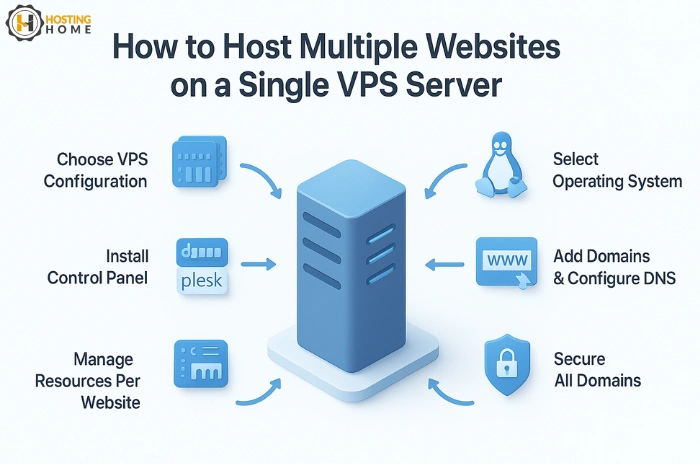
Step 1: Select the Right VPS Configuration
Choose the right resources according to your workload before you start hosting multiple websites. That includes RAM, storage, CPU cores, bandwidth.
If looking for a budget option, just compare VPS server price and find plans that offer more power without overspending. Comparing the VPS server price in India today is very easy across providers to choose the best performing yet affordable plan.
Some companies even provide a short VPS server trial for users who want to try before buying.
Step 2: Choosing an Operating System
Both Linux and Windows are good for hosting multiple websites. However, it depends on the type of applications you will be running.
Linux VPS servers are preferred for PHP, WordPress, and open-source apps. Some even look for a free VPS server Linux for new users, though those options are limited for learning.
Users working with ASP.NET, MSSQL, or Windows-based tools prefer for a VPS server Windows plan.
If you are looking to reduce the cost, cheap Windows VPS server India options allow you to host several websites without spending too much.
Step 3: Install a Control Panel for Easy Management
A control panel saves time, and it’s easy to manage domains, databases, emails, and files. It also helps in the division of resources across multiple websites.
Popular control panels include:
- cPanel/WHM
- Plesk
- DirectAdmin
- Webuzo
With a control panel, even a new user can operate a VPS cloud server without any advanced technical skills.
Step 4: Add Domains and Configure DNS
Once your VPS is ready, you can start adding websites. You simply:
- Add each domain in the control panel
- Create hosting accounts for each website
- Update DNS records with your VPS IP
- Wait for DNS update
This setup makes every website run separately while still sharing the same server.
Step 5: Maintain Separate Resources for Each Website
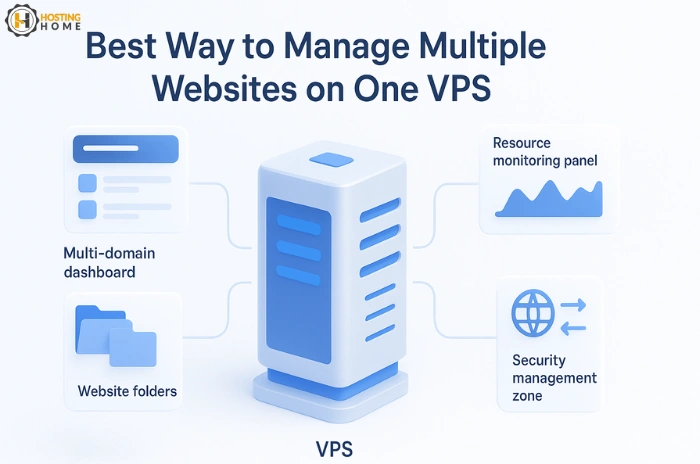
Hosting multiple websites on a single system works smoothly only if you manage resources correctly. Make sure:
- Every website has its own folder
- Every domain has a separate email account.
- CPU/RAM usage is monitored
- Security rules are set
In this case, no single website consumes all VPS resources.
Step 6: Make all domains highly secure.
Security is important because if one website gets attacked, it can affect others. To avoid this:
- Use firewalls
- Install malware scanners
- Set backups
- Update applications regularly
- Keep strong passwords.
A fully managed VPS server solves this problem because the majority of the maintenance and security been handled by your hosting provider for you.
Step 7: Increase Your VPS When Needed
As your websites grow, you may want more storage or CPU power. Scaling is the biggest advantage of using VPS. If you have the right provider for VPS servers, you will be able to upgrade instantly without downtime.
You can buy VPS server India plans from a company that supports quick upgrades when you plan to expand your digital business. You can also buy VPS server online anytime without long setup processes.
Why Choosing the Best VPS Provider Matters?
The stability of your server makes sure the speed of your websites. This is why choosing the best VPS server for long-term use is of much important. A Trusted company will give you strong uptime, high speed, and complete technical support.
Whether you want to select a simple plan or cheap VPS server hosting, you must check its quality before buying. The best VPS server provider is chosen by many businesses today because it reduces the maintenance workload and makes sure the speed of your website.
If you are ready to expand your online presence, you can easily buy VPS server plans that support multiple domains without speed and uptime issues.
Why Hosting Home is the Best Option for Multi-Site VPS
If you are looking for a stable, powerful VPS with quality features, one of the Trusted providers of such services is Hosting Home.
- Powerful VPS servers with SSD/NVMe storage
- Affordable VPS server price plans
- Linux & Windows VPS
- Free SSL certificate
- Free weekly backups
- Free DDoS protection
- Free migration support
- Free 24/7 dedicated WhatsApp support
- Fully-managed VPS options
- 99.99% uptime
- Instant set-up and easy scaling

Start hosting smarter with Hosting Home, your Trusted VPS Hosting partner in India.